 goodbyedpi
 – Unblock Websites Without a VPN
goodbyedpi is a lightweight Windows utility that defeats Deep Packet Inspection, the filtering method providers use to block websites. It reshapes your traffic locally, keeping your speed and IP address intact. Free, open source and ready to run in minutes.
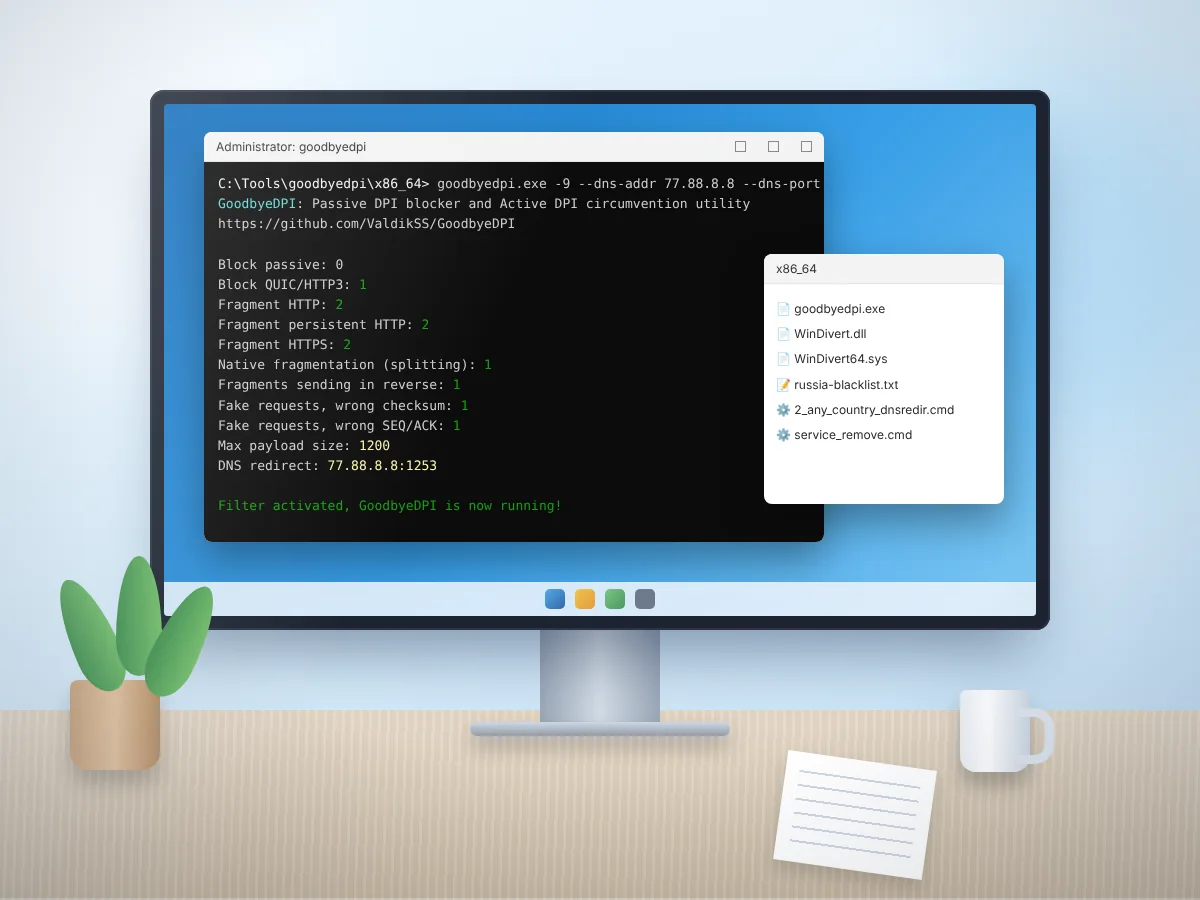
What Is goodbyedpi?
goodbyedpi is a compact, open-source utility for Windows that circumvents Deep Packet Inspection (DPI), the filtering technique many internet service providers use to block or throttle websites. Rather than routing your traffic through a remote server, it reshapes outgoing packets on your own computer so that filtering equipment can no longer recognise the requests it was configured to stop.
The project was created by the developer ValdikSS and is published on GitHub under the Apache 2.0 licence. It relies on the WinDivert driver, which uses the Windows Filtering Platform to pass network packets to the program before they leave the machine.
Because nothing is tunnelled, goodbyedpi avoids the familiar drawbacks of conventional workarounds: there is no subscription to pay, no third-party server that sees your traffic and no noticeable rise in latency. This makes it particularly well suited to video calls, online gaming and everyday browsing on filtered connections.
goodbyedpi at a glance
- Handles both passive DPI (optical splitters, port mirroring) and active DPI placed inline
- Keeps your own IP address and connection speed, with no tunnel or remote server
- Runs from a console window or as a background Windows service
- Ships with ready-made batch scripts and blacklist support
- Free, transparent source code that anyone can audit or build
Key Features of goodbyedpi
Each feature addresses a specific way in which filtering systems identify and interrupt connections.
Packet Fragmentation
Splits HTTP and HTTPS requests into small segments, so the hostname never appears in a single packet that the filter can read.
Header Manipulation
Alters the case and spacing of the HTTP Host header, which confuses rigid pattern-matching rules while remaining valid for web servers.
Fake Request Mode
Sends decoy packets with a short TTL, wrong checksum or out-of-date sequence number that DPI accepts but the destination server discards.
DNS Redirection
Forwards DNS queries to an alternative resolver and port, preventing poisoned answers from sending you to block pages.
Blacklist Targeting
Applies circumvention only to the domains listed in a text file, leaving all other traffic completely untouched.
Low Overhead
Uses minimal CPU and memory, and the --max-payload option skips large transfers to keep downloads fast.
How goodbyedpi Works
DPI equipment inspects the first packets of a connection, looking for the website name inside the HTTP Host header or the TLS Server Name Indication (SNI). When it finds a blocked name, it either drops the traffic or injects a redirect to a warning page.
goodbyedpi intercepts those packets on your computer and changes their form without altering their meaning. A web server reassembles fragmented data and ignores decoy packets, but a filter that inspects packets one at a time cannot. The result is a normal, direct connection to the site you requested.
Passive DPI is handled differently. Since it cannot stop packets directly, it injects forged redirects and reset packets instead. goodbyedpi recognises these forgeries and drops them, so the genuine response from the website arrives undisturbed.
- CaptureWinDivert hands outgoing packets to goodbyedpi before they reach the network adapter.
- ReshapeThe chosen mode fragments requests, edits headers or prepares decoy packets.
- ReleaseThe modified packets continue to the destination, where they are reassembled normally.
- ProtectOptional rules drop forged redirects and reset packets injected by passive DPI.
goodbyedpi Modes and Options
Numbered modes bundle the most useful flags. Modes -1 to -4 are the legacy sets, while -5 to -9 are the modern sets; -9 is the default.
| Mode | Equivalent flags | Best suited to |
|---|---|---|
-1 | -p -r -s -f 2 -k 2 -n -e 2 | Maximum compatibility on older or strict networks |
-2 | -p -r -s -f 2 -k 2 -n -e 40 | Faster HTTPS while remaining broadly compatible |
-3 | -p -r -s -e 40 | Faster HTTP and HTTPS on lighter filtering |
-4 | -p -r -s | Best speed where only passive DPI is present |
-5 | -f 2 -e 2 --auto-ttl --reverse-frag --max-payload | Active DPI, with TTL detected automatically |
-6 | -f 2 -e 2 --wrong-seq --reverse-frag --max-payload | Active DPI that ignores sequence numbers |
-7 | -f 2 -e 2 --wrong-chksum --reverse-frag --max-payload | Active DPI that ignores checksums |
-8 | -f 2 -e 2 --wrong-seq --wrong-chksum --reverse-frag --max-payload | Combined decoy methods |
-9 | -8 plus -q (blocks QUIC/HTTP3) | Default; strongest general-purpose choice |
goodbyedpi System Requirements
The utility is lightweight, but it does depend on a few conditions being met before the driver can load.
- Operating systemWindows 7, 8, 8.1, 10 or 11, in 32-bit (x86) or 64-bit (x86_64) editions.
- Administrator rightsRequired to load the WinDivert driver and to install the background service.
- Driver signing supportOlder Windows 7 systems need update KB3033929 (SHA-256 signing) or a full Windows Update.
- HardwareAny modern processor and a few megabytes of disk space and memory are sufficient.
How to Install goodbyedpi
goodbyedpi needs no installer. Once the archive is extracted, the program can run directly from its folder. For a fuller walkthrough, see the step-by-step installation guide.
- Download the archiveObtain the latest release archive from the official repository, or the source package from the download section below.
- Extract the filesUnpack it to a permanent folder such as
C:\Tools\goodbyedpi. - Run a quick-start scriptRight-click
2_any_country_dnsredir.cmdand choose Run as administrator. - Test your sitesKeep the console open and load the pages that were previously unreachable.
goodbyedpi Use Cases
Use a direct connection when your provider filters websites with Deep Packet Inspection.
Everyday browsing
Access websites affected by DPI filtering while keeping your own IP address.
Streaming and calls
Try DPI circumvention for filtered services without routing traffic through a remote server.
Selected websites
Use a blacklist to apply your configuration only to the domains you choose.
goodbyedpi Batch Scripts
The release package includes ready-made scripts that can be edited to suit your network.
2_any_country_dnsredir.cmd
The recommended starting point outside Russia. It applies circumvention to all traffic and redirects DNS to an alternative resolver.
1_russia_blacklist_dnsredir.cmd
Recommended for Russia. It limits circumvention to the bundled blacklist of filtered domains and redirects DNS.
service_install_russia_blacklist_dnsredir.cmd
Installs goodbyedpi as a Windows service with the blacklist and DNS redirection, so it starts with the system.
service_remove.cmd
Stops and removes the installed service cleanly. Run it before updating or relocating the program folder.
goodbyedpi Troubleshooting
Most problems trace back to the driver, conflicting software or a mode that does not match your provider's filtering. Running the program from an elevated console makes diagnosis far easier, as every error message remains visible. Work through the points on the right, then consult the dedicated guide to common errors if a site still fails to load.
- Driver fails to load: run as administrator and, on Windows 7, install KB3033929.
- Killer network adapters: disable "Advanced Stream Detect" in Killer Control Center.
- Sites still blocked: try another mode, such as
-5or-7, and confirm DNS redirection. - Trading software conflicts: start QUIK before launching goodbyedpi.
- Slow downloads: add
--max-payloadto skip large packets.
Download goodbyedpi
The package below contains the complete goodbyedpi source tree from the official GitHub repository. Ready-to-run executables, together with the quick-start scripts and blacklist files, are published on the repository's Releases page.
Download goodbyedpigoodbyedpi: Conclusion
goodbyedpi offers a precise, lightweight answer to DPI-based filtering. By reshaping packets locally, it restores access to blocked websites without the latency, cost or privacy trade-offs of a remote tunnel. Start with the default mode or a quick-start script, adjust the flags to match your provider, and install the service once you have found a stable configuration. Pair it with DNS redirection or Secure DNS, and use a blacklist when you want circumvention applied only where it is genuinely needed.
Because the source code is public and the licence is permissive, goodbyedpi remains one of the most transparent tools of its kind for Windows users.
goodbyedpi FAQs
goodbyedpi circumvents Deep Packet Inspection on Windows. It reshapes outgoing packets on your computer so that filtering equipment used by internet providers can no longer recognise and block requests to particular websites.
Yes. goodbyedpi is free, open-source software released under the Apache 2.0 licence. There are no subscriptions, accounts or usage limits.
goodbyedpi supports Windows 7, 8, 8.1, 10 and 11 in both 32-bit and 64-bit editions. Older Windows 7 systems need update KB3033929 to load the driver.
No. A VPN routes traffic through a remote server, whereas goodbyedpi works entirely on your own computer. Your traffic still travels directly to each website from your own IP address.
In most cases the effect is negligible, because there is no extra server in the path. Aggressive modes can slow the opening of connections slightly; the --max-payload option keeps large downloads fast.
goodbyedpi loads the WinDivert driver to intercept network packets, and Windows only allows drivers to be loaded by an administrator.
Begin with the default mode, -9. If some sites remain blocked, try -5, -6 and -7, then the legacy modes -1 to -4, keeping the fastest one that works reliably.
No. goodbyedpi is not a privacy tool. It prevents filters from recognising blocked requests, but your provider can still see the addresses you connect to.
Yes. The included service_install scripts register goodbyedpi as a Windows service, so it runs in the background from startup. Run service_remove.cmd to remove it.
The most common causes are DNS poisoning, a mode that does not match your provider's filtering, or QUIC traffic. Enable DNS redirection or Secure DNS and try another mode.
The source code is public and can be audited by anyone. Obtain it only from the official GitHub repository, as modified copies of network tools can be dangerous.
Some security products flag WinDivert because packet interception is a capability that malware also uses. Restore any quarantined files and add the goodbyedpi folder to your exclusions.
No. goodbyedpi is built specifically for Windows and depends on the Windows Filtering Platform through WinDivert.
Close its console window to stop it immediately. If it runs as a service, stop it from services.msc or remove it with service_remove.cmd.